Savr Recipes
Creating an enjoyable experience for users to cook their favorite recipes

Company
Personal Project
Tools
Figma
Role
UX/UI Designer
Timeline
1 Week - 3/2023
Background & Motivation
This project was conducted based on a design challenge from Springboard and Bitesize UX in order to simulate the GV Design Sprint process. SAVR is not a real application and all research was conducted outside of this challenge.
Savr is a new startup that shows hundreds of recipes, and cooking tips for at-home chefs. They have an active community of users who rate and review recipes for other users. Recently, Savr has seen some negative reviews about recipes that involve many steps, or more advanced techniques. Although there are users excited to try new recipes, they end up disappointed with the outcome, because they didn’t feel the instructions were clear, or easy to follow. They have brought me onboard to conduct a design sprint and our goal is to create recipes that have clear and easy to follow instructions so that users have a stress free, smooth, enjoyable, and seamless experience when cooking something new.
Day 1: Understanding the Problem/Mapping
On day 1 of the design sprint, I began by focusing on understanding the problem and defining the challenge that the one-man team will tackle. Bitesize UX provided research highlights that contained user interviews and personas to help me understand the target audience and their pain points when using Savr Recipes.
During a user interview, one user expressed her concerns about cooking challenging recipes. She mentioned that using complex or unfamiliar ingredients makes her feel stressed. Additionally, she stated that unclear instructions in some recipe steps sometimes force her to skip ahead, which can result in mistakes. To make the cooking process easier, she suggested that all the steps should be presented in a clear and logical order, including preparation steps, instead of just focusing on the cooking process.
How might we provide a stress-free experience that guides users through each step of the cooking process?

User Map
Day 2: Sketch
After reviewing all the ideas generated on day one, I conducted lightning demos to identify effective solutions from competitors and participated in Crazy8s to generate a large number of ideas on paper. Using these insights, I then refined and combined the selected ideas into a storyboard that outlines the user's journey.
Lighting Demos
In order to better understand how to address user pain points, I conducted a lightning demo to analyze competitors and identify key features that could be adapted for use in Savr. To do this, I studied two companies, Tasty and Youtube, to see how they addressed similar challenges. Tasty's cooking app, for instance, allows users to discover new recipes, share their own dishes, and learn how to cook, while Youtube's chapter feature enables viewers to quickly search for specific parts of a video. I believe that incorporating these types of features into Savr could help to streamline the cooking process and make it more enjoyable for users

Crazy 8s
After conducting research on competitors and seeking inspiration, I utilized the Crazy 8s exercise to generate a number of ideas and concepts. Upon evaluating these concepts, I determined that the “steps” screen was of utmost importance as it is where users take action and cook. Through my sketches, I designed this screen to enable users to learn how to cook in a clear and simple manner, using both textual and visual aids. Furthermore, to alleviate any confusion that users may encounter during the process, I incorporated a video demonstration to provide additional clarification. By doing so, users are reassured about how the task should look and learn how to perform the action with ease, minimizing any potential stress that may arise while cooking.

Crazy 8s
Solution Sketch
After generating multiple design sketches, I focused on identifying the most crucial screen for user interaction. To narrow down my options, I created a concise storyboard outlining the steps users would take when following detailed cooking instructions. This allowed me to evaluate the usability and effectiveness of my design and make necessary adjustments before moving onto the prototyping stage.

Solution Sketch
Day 3: Decide
Storyboard
To ensure that cooking with Savr is a stress-free experience, I incorporated a unique feature that allows users to view specific steps in detail. This feature is designed to display clear instructions in text while also providing a video demonstration for users to follow along with. By doing so, users can easily understand the instructions, follow the steps accurately, and know what the end result should look like. To illustrate this feature, I created a detailed storyboard that outlines the various steps users would take to cook their desired dish. Throughout the storyboard, I provided annotations and explanations of how users would interact with the different screens. My primary focus while designing the screens was to create an enjoyable experience for users while also addressing their pain points and ensuring that the cooking process was straightforward and easy to follow.

Storyboard
Day 4: Prototype
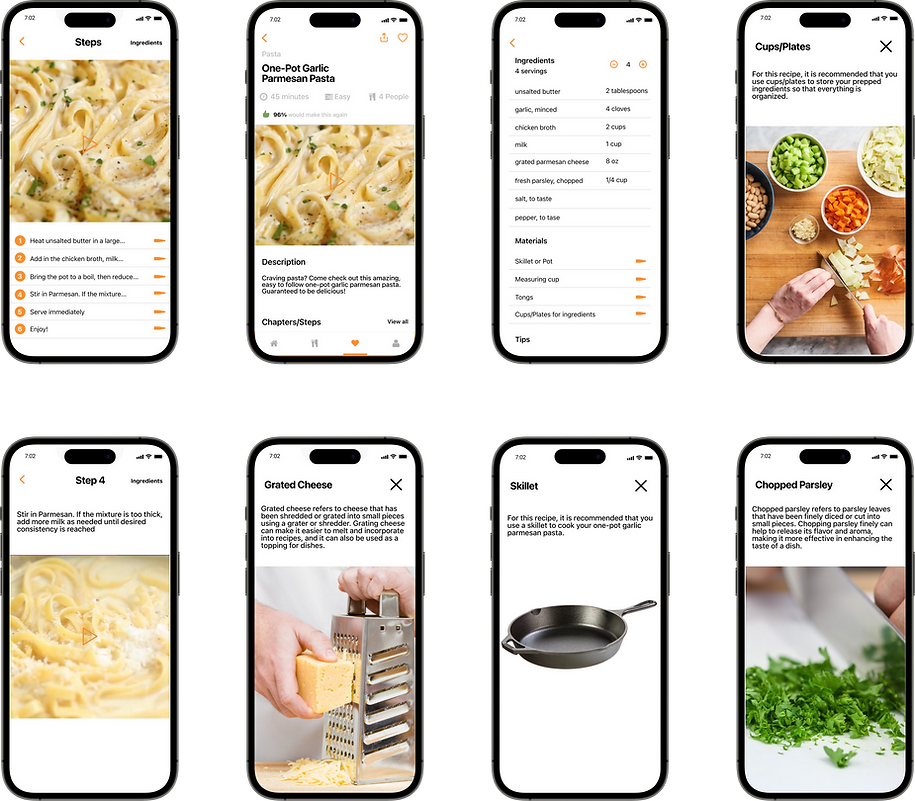
Once I had finalized my storyboard, I began creating a prototype of Savr's screens. With only one day to work with, I utilized UI kits to expedite the process without compromising the brand's look and feel. While designing the high-fidelity mockup, I kept in mind the users' pain points and aimed to provide a clear, simple, and informative interface. My goal was to ensure that users could navigate the app without any difficulties while understanding the recipe they were following. To further improve the user experience, I plan to conduct user testing to identify and address any issues that arise. With the refined version of Savr, I am excited to offer a seamless cooking experience for all users.
UI Elements & References

High-Fidelity
Day 5: Test
On the final day of the design sprint, I tested my prototype by contacting five target users and conducting user testing. During the testing, I provided context about Savr’s situation and learned about my users' cooking experiences. Overall, users had no difficulty interacting with the screen, but they did provide interesting feedback for product enhancement. For example, one user mentioned that they enjoyed looking at reviews to measure how others felt about making a dish. This allows them to have a sense of security and understanding of whether cooking the selected dish is worth their time. Another suggestion was providing substitute ingredients for different diets to promote inclusivity. Everyone I interviewed interacted smoothly with the app and found it intuitive. The user interviews were informative, helping me realize features I hadn't thought of before and inspiring me to go back and improve my designs for the best user experience.
Reflection
Participating in the design sprint was both challenging and enlightening. The fast-paced, yet thorough process allowed me to uncover the root of the problem and develop innovative solutions. By the end of the week, I felt compelled to revisit my designs and gain a deeper understanding of the company's context. I realized that a clear understanding of the company and its application is essential to addressing its challenges effectively. Overall, the design sprint experience left me feeling inspired and motivated to keep exploring new ideas and solutions.